

Why a Good Proxy Isn't Enough for Multi-Account Management
A reliable IP address can solve one problem. It cannot solve every problem your browser creates.
Imagine an affiliate marketer managing several campaigns.
They invest in quality proxies, assign different IP addresses to their projects, and carefully organize their accounts.
Yet the workflow still feels fragile.
Browser sessions become mixed up. Websites remember unexpected preferences. A login works on one computer but requires authentication again on another. Automation behaves differently across browser environments.
The natural reaction is to investigate the proxies.
But what if the IP address isn't the problem?
For businesses managing multiple online accounts, the browser environment matters just as much as the network connection.
Understanding how these two layers work together is becoming essential for affiliate marketing, advertising, e-commerce, and browser automation.
1. Your IP Address Is Only One Part of Your Online Environment
When you visit a website, the server can observe your network connection.
Depending on the connection and available information, this may reveal:
Your public IP address
Approximate geographic location
Network provider
Hosting or residential network classification
Network reputation signals
A proxy changes the network route used for supported traffic.
This can be useful for legitimate activities such as regional website testing, ad verification, market research, and managing network access requirements.
But the website may also collect information from your browser.
That information comes from a different layer.
2. What Websites Can Learn From Your Browser
Modern browsers expose technical characteristics that help websites deliver compatible content.
Some of these characteristics can also contribute to browser fingerprinting.
Examples include:
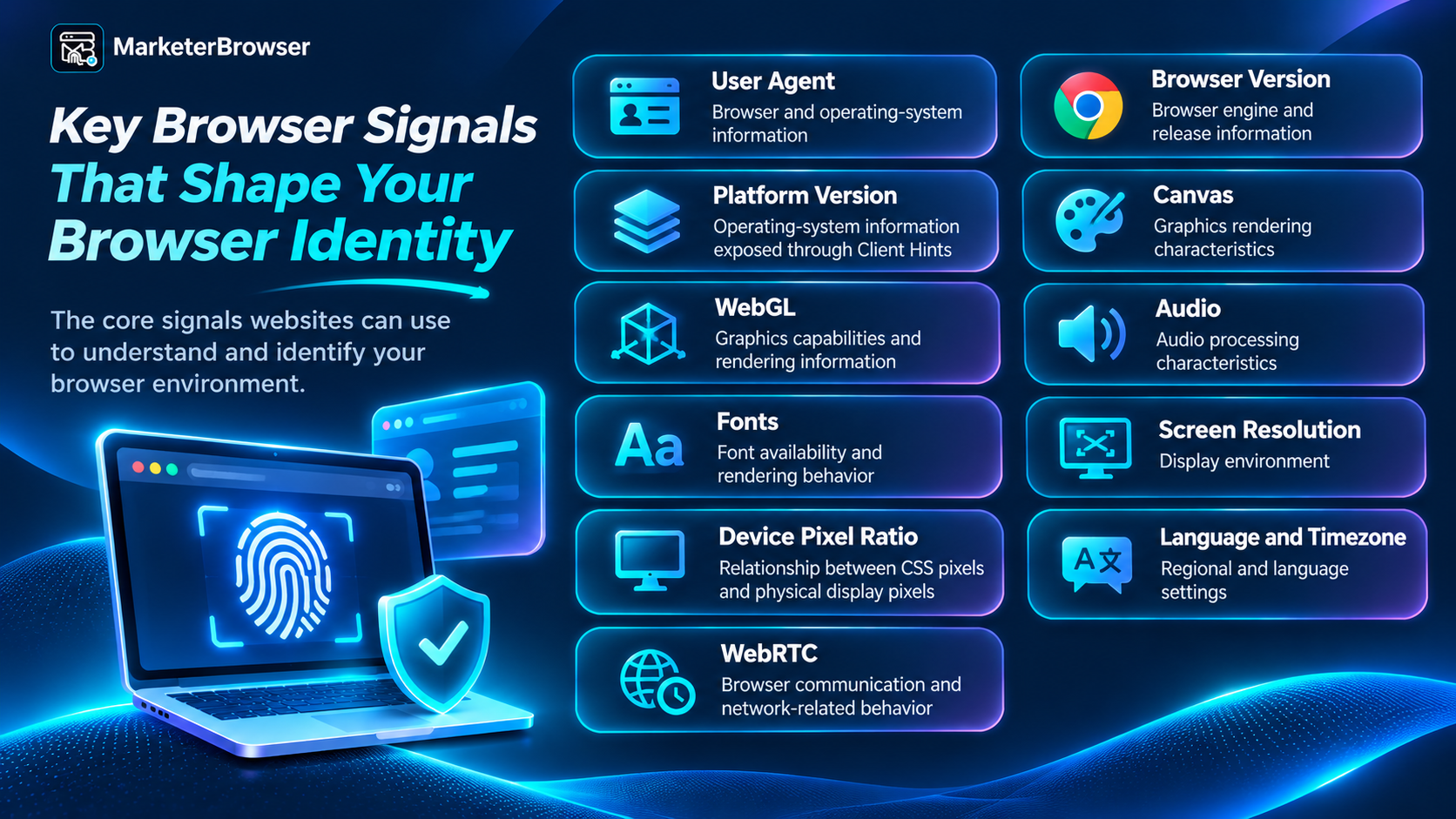
These signals are not equivalent to an IP address.
A proxy can change the network route without changing the browser's operating-system information, graphics characteristics, or stored website data.
This is why proxy management and browser profile management should be treated as complementary technologies.
3. The Three Layers of Multi-Account Management
A useful way to understand modern browser operations is to divide them into three layers.
Layer One: Network Identity
This concerns how the browser connects to the internet.
Relevant considerations include:
IP address
Proxy type
Network location
Connection stability
DNS behavior
Network performance
Layer Two: Browser Identity
This concerns the browser characteristics visible to websites.
Examples include:
Operating system
Browser version
User Agent
Platform Version
Canvas and WebGL
Screen configuration
Language and timezone
Layer Three: Browser Data
This concerns the information websites save within a browser environment.
Examples include:
Cookies
Local Storage
IndexedDB
Browsing history
Saved website preferences
Extension-related data
These layers interact, but they solve different problems.
A proxy manages the network route. A browser profile manages the browsing environment. Browser storage maintains website data.
Businesses that understand this distinction can troubleshoot problems more effectively.
4. Why Changing an IP Address Doesn't Automatically Change a Browser Fingerprint
Suppose a business uses two different proxies.
The first connection routes through Germany.
The second routes through Brazil.
The public IP addresses may be different, but the browser can still report the same operating system, browser version, screen characteristics, and graphics environment.
This isn't necessarily a problem.
For legitimate testing, it simply means that network location and browser configuration are separate variables.
However, if a company is trying to reproduce the experience of users in different regions, changing the IP address alone may not be sufficient.
The website might also use language preferences, timezone settings, cookies, or account information to determine what content to display.
A complete testing workflow should consider all relevant factors.
5. Why Browser Consistency Matters More Than Randomization
Fingerprint browsers are sometimes marketed as tools that generate random browser characteristics.
But randomness is not the same as realism or consistency.
Consider a browser profile that reports a desktop Windows operating system while exposing device characteristics associated with an unrelated mobile environment.
That combination may be unsuitable for realistic compatibility testing.
A more practical approach is to maintain a coherent browser configuration.
For example:
Use a browser version compatible with the intended environment.
Keep User Agent and Client Hints information consistent.
Select appropriate screen and device characteristics.
Maintain predictable language and timezone settings.
Verify the configuration using browser testing tools.
The goal should be a stable, reproducible environment rather than changing every available parameter.
This is particularly important for developers, QA teams, and businesses that need to investigate problems consistently.
6. Affiliate Marketing: Organizing Campaign Environments
Affiliate marketers often manage several types of online resources.
A campaign may involve an affiliate network, advertising platform, analytics dashboard, tracking software, and landing pages.
Another campaign may use completely different services.
A practical workflow is to separate authorized campaign environments.
For example:
Campaign A — SaaS Products
Affiliate dashboard, analytics, and campaign research.
Campaign B — E-Commerce Products
Product research, advertising tools, and performance reporting.
Campaign C — International Markets
Regional landing-page research and localization testing.
A proxy service can support relevant network requirements.
A browser-profile manager can help maintain separate sessions and configurations.
Together, these tools can make campaign operations easier to organize.
They do not replace compliance with affiliate-network rules or advertising-platform policies.
7. Advertising Agencies: Managing Clients Without Mixing Sessions
An advertising agency may work with Meta Ads, Google Ads, TikTok Ads, and multiple analytics services.
Each client has separate business assets and account permissions.
Using dedicated browser profiles can help organize client environments and reduce accidental cross-account activity.
For international advertising campaigns, network configuration may also be useful for testing landing pages from different regions.
Consider an agency managing campaigns in the United States, Germany, and Brazil.
Its testing team may need to examine:
Regional landing pages
Language selection
Currency display
Redirect behavior
Mobile compatibility
Form functionality
Proxy services and browser profiles can support this work when combined with appropriate testing procedures.
The objective is to verify the customer experience, not to manipulate advertising delivery or bypass platform restrictions.
8. E-Commerce: One Business Can Have Many Browser Workspaces
E-commerce companies frequently operate across multiple websites and services.
These may include:
Store administration
Marketplace seller dashboards
Supplier portals
Advertising platforms
Customer support tools
Inventory systems
Payment and analytics services
Separate browser profiles can help organize these activities.
For example, a company may maintain dedicated environments for different stores or departments.
A consistent browser environment can also help teams reproduce website issues and investigate session-related problems.
This becomes especially useful when operations involve several employees or computers.
9. Browser Automation: Why Stable Environments Matter
Browser automation introduces another challenge.
An automated workflow may open a website, authenticate, collect authorized information, test an interface, or perform a predefined business task.
Tools such as Playwright and Selenium can automate browser interactions.
But automation still depends on the browser environment.
If the environment changes unexpectedly, a workflow may behave differently.
For example:
A website may display a different layout.
A session may expire.
A language setting may change.
A page may load differently because of network conditions.
A browser update may affect compatibility.
For reliable automation, teams should manage both the network connection and browser configuration.
This is especially important when workflows involve many browser profiles.
10. The Overlooked Problem: Transferring Browser Sessions Between Computers
Imagine that an employee works with an account on one computer.
Later, the business transfers the browser profile to another computer.
The cookies appear to have been copied.
But when the employee opens the website, the account is logged out.
Why?
Because copying browser data does not guarantee that the website will accept the previous authentication session.
Possible causes include:
Expired or invalidated session cookies
Device-related authentication checks
Browser environment changes
Missing application storage
Operating-system-bound encryption
Website security policies
Some websites use Local Storage or IndexedDB alongside cookies.
Others require fresh authentication when the device changes.
This is why businesses should distinguish between transferring browser data and restoring authenticated sessions.
A reliable migration process should respect website authentication and browser security mechanisms.
11. Where MarketerBrowser Fits Into the Workflow
This is where a dedicated fingerprint browser becomes useful.
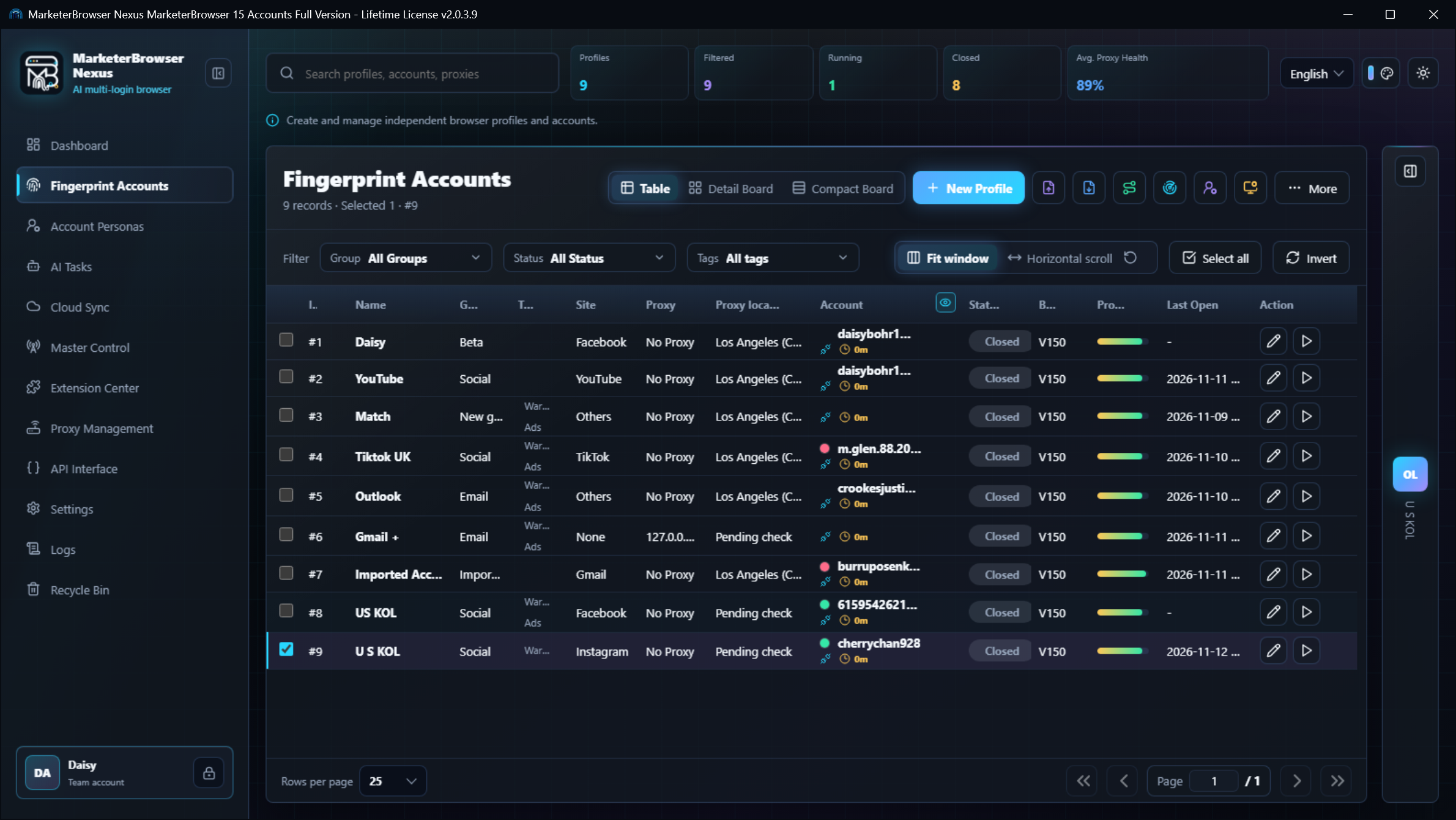
MarketerBrowser provides browser-profile management capabilities for users who need to organize multiple browser environments.
Its profile configuration interface includes settings related to:
Operating systems
Browser versions
User Agents
Platform Versions
Network configuration
Browser fingerprint characteristics
MarketerBrowser also provides browser-data management and automation-oriented features.
For businesses already using proxy services, a browser-profile manager can serve as the complementary layer that organizes the browser environments associated with different projects.
For example:
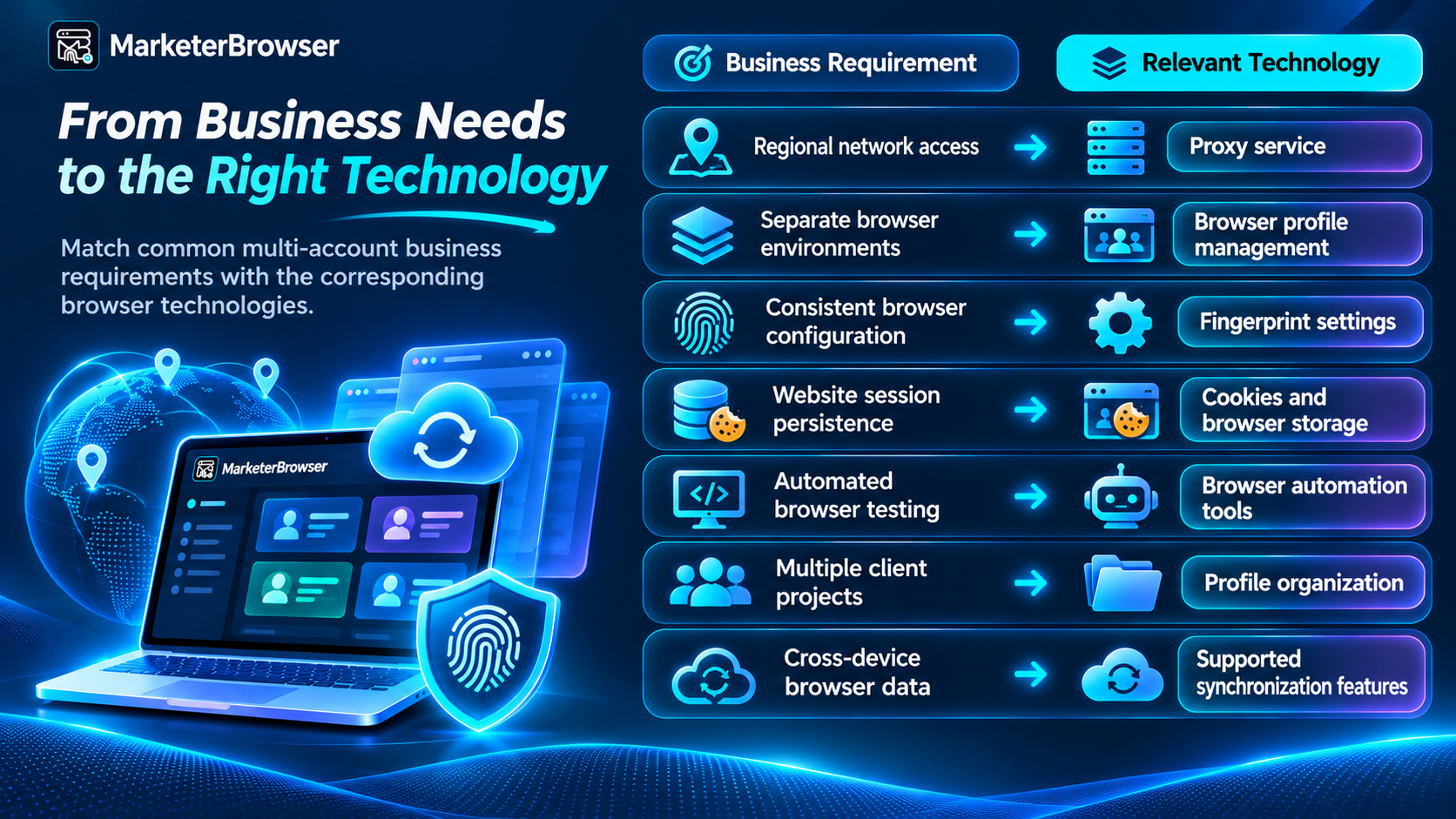
The important point is not that one technology replaces another.
A well-designed browser workflow uses the appropriate tool for each layer.
12. What Should You Check Before Choosing a Proxy and Fingerprint Browser?
Before investing in a large multi-account setup, consider the following questions.
Is the network reliable?
Test connection stability, latency, and the suitability of the network for your business requirements.
Are browser profiles properly isolated?
Check whether profiles maintain separate cookies and other browser storage.
Are fingerprint settings consistent?
Review browser version, operating system, User Agent, and relevant device characteristics.
Can the workflow be reproduced?
For testing and automation, predictable environments are often more useful than arbitrary changes.
What happens when a session expires?
Make sure your team has a legitimate account recovery and reauthentication process.
Does the setup scale?
Measure browser startup time, resource consumption, and automation performance before expanding to hundreds of profiles.
Is the workflow compliant?
Use authorized accounts and follow applicable website, advertising, and affiliate-network policies.
The Bigger Picture: Better Browser Operations Start With Understanding the Layers
A reliable proxy is valuable.
But a proxy cannot manage browser cookies, preserve IndexedDB, configure User-Agent Client Hints, or organize hundreds of browser profiles.
Likewise, a fingerprint browser cannot guarantee network reliability or prevent websites from requiring additional authentication.
The technologies solve different problems.
For affiliate marketers, advertising agencies, e-commerce companies, developers, and AI automation teams, understanding those differences can lead to more reliable operations.
The future of multi-account management isn't simply about having more IP addresses or more browser profiles. It's about building consistent, organized, and maintainable digital workspaces.
Explore Browser Profile Management With MarketerBrowser
If your business already uses proxies for legitimate research, testing, or account operations, consider how browser profile management can complement your network infrastructure.
Explore MarketerBrowser to learn more about browser identities, isolated profiles, and automation-oriented workflows.
MarketerBrowser: https://www.marketerbrowser.com/